
 Your community, in one place
 354 executions
 12,812 scripts
 115 users

 Save
Save



 Follow
 Play
Play
 00Mobile
M
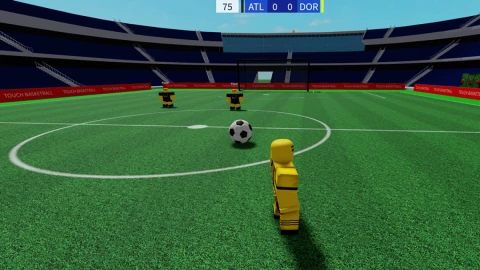
Touch Soccer Script Keyless
MaxLegendsOwnerThe owner of BloxScripts.fun.Early CreatorPublish a script as one of the first 100 accounts.·Touch Soccer
By GreatScript · Rscripts
 BloxScripts.fun
Touch football farming speed jump + more
-- [[ BloxScripts Risk Notice ]]
-- This script has not been verified by BloxScripts.fun. Deal with caution.
--
-- Stay safe:
--   • Never log in on unofficial Roblox sites or lookalike domains.
--   • Real Roblox links use roblox.com (check the .com ending).
--   • Treat fake Roblox login / "claim reward" pages as phishing.
-- [[ End BloxScripts Risk Notice ]]

if _G.FootballHubLoaded then return end
_G.FootballHubLoaded = true

local Rayfield = loadstring(game:HttpGet('https://sirius.menu'))()

-- Global Configuration States
getgenv().TrajectoryActive = false
getgenv().PredictionLength = 1.0
getgenv().EspActive = false
getgenv().ShowDistance = false
getgenv().PredictionRingActive = false
getgenv().BallPointerActive = false

-- Movement States
getgenv().CustomSpeedEnabled = false
getgenv().TargetSpeed = 16 -- Roblox default is 16
getgenv().CustomJumpEnabled = false
getgenv().TargetJump = 50 -- Roblox default is 50

local Window = Rayfield:CreateWindow({
    Name = "⚽ Touch Football Extended Suite",
    LoadingTitle = "Assembling Engine...",
    LoadingSubtitle = "Visuals & Movement Controls",
    ConfigurationSaving = { Enabled = false },
    Discord = { Enabled = false },
    ToggleUIKeybind = Enum.KeyCode.K
})

local BallTab = Window:CreateTab("Ball Metrics", 0)
local PlayerTab = Window:CreateTab("Pitch Awareness", 0)
local MovementTab = Window:CreateTab("Movement Utility", 0) -- New Tab Added

-- Core Helper: Locates active match soccer ball safely
local function findActiveBall()
    local Workspace = game:GetService("Workspace")
    local field = Workspace:FindFirstChild("FootballField")
    local soccerBall = field and field:FindFirstChild("SoccerBall")
    if not soccerBall then
        soccerBall = Workspace:FindFirstChild("SoccerBall") or Workspace:FindFirstChild("Football")
    end
    return soccerBall
end

-- Structural Setup for Trajectory Vector Endpoint
local targetNode = Instance.new("Part")
targetNode.Name = "TrajectoryTargetAnchor"
targetNode.Size = Vector3.new(1, 1, 1)
targetNode.Transparency = 1
targetNode.CanCollide = false
targetNode.Anchored = true
targetNode.Parent = game:GetService("Workspace")

local targetAttachment = Instance.new("Attachment")
targetAttachment.Parent = targetNode

-- Structural Setup for Ball Destination Ground Ring
local groundRing = Instance.new("Part")
groundRing.Name = "BallImpactRing"
groundRing.Shape = Enum.PartType.Cylinder
groundRing.Size = Vector3.new(0.2, 6, 6)
groundRing.Orientation = Vector3.new(0, 0, 90)
groundRing.Material = Enum.Material.Neon
groundRing.Color = Color3.fromRGB(255, 0, 0)
groundRing.Transparency = 0.6
groundRing.CanCollide = false
groundRing.Anchored = true
groundRing.Visible = false
groundRing.Parent = game:GetService("Workspace")

-- Structural Setup for Personal Navigation Pointer Arrow
local arrowPointer = Instance.new("Part")
arrowPointer.Name = "BallDirectionPointer"
arrowPointer.Size = Vector3.new(1, 0.4, 3)
arrowPointer.Material = Enum.Material.Neon
arrowPointer.Color = Color3.fromRGB(255, 255, 0)
arrowPointer.Transparency = 0.4
arrowPointer.CanCollide = false
arrowPointer.Anchored = false
arrowPointer.Visible = false
arrowPointer.Parent = game:GetService("Workspace")

local pointerWeld = Instance.new("Weld")
pointerWeld.Name = "PointerAttachmentWeld"
pointerWeld.Parent = arrowPointer

-- Setup HUD Overlay Distance Box
local screenGui = Instance.new("ScreenGui")
screenGui.Name = "AdvancedFootballGui"
screenGui.ResetOnSpawn = false
screenGui.Parent = game:GetService("CoreGui")

local distanceLabel = Instance.new("TextLabel")
distanceLabel.Size = UDim2.new(0, 220, 0, 45)
distanceLabel.Position = UDim2.new(0.5, -110, 0.04, 0)
distanceLabel.BackgroundTransparency = 0.4
distanceLabel.BackgroundColor3 = Color3.fromRGB(15, 15, 15)
distanceLabel.TextColor3 = Color3.fromRGB(255, 255, 255)
distanceLabel.TextSize = 16
distanceLabel.Font = Enum.Font.SourceSansBold
distanceLabel.Visible = false
distanceLabel.Parent = screenGui

-- [BALL METRICS MANAGEMENT]
BallTab:CreateToggle({
    Name = "Project Path Trajectory Line",
    CurrentValue = false,
    Flag = "BallPathToggle",
    Callback = function(v) getgenv().TrajectoryActive = v end,
})

BallTab:CreateSlider({
    Name = "Line Look-Ahead Accuracy",
    Min = 0.5,
    Max = 3.0,
    Increment = 0.1,
    ValueName = " seconds",
    CurrentValue = 1.0,
    Flag = "DistanceSlider",
    Callback = function(v) getgenv().PredictionLength = v end,
})

BallTab:CreateToggle({
    Name = "Predict Ground Landing Drop Ring",
    CurrentValue = false,
    Flag = "PredictionRingToggle",
    Callback = function(v)
        getgenv().PredictionRingActive = v
        groundRing.Visible = v
    end,
})

BallTab:CreateToggle({
    Name = "Display Live Distance UI Box",
    CurrentValue = false,
    Flag = "BallDistanceToggle",
    Callback = function(v)
        getgenv().ShowDistance = v
        distanceLabel.Visible = v
    end,
})

-- [PITCH AWARENESS MANAGEMENT]
PlayerTab:CreateToggle({
    Name = "Smart Team-Color Player ESP",
    CurrentValue = false,
    Flag = "SmartEspToggle",
    Callback = function(stateValue)
        getgenv().EspActive = stateValue
        if not stateValue then
            for _, p in ipairs(game.Players:GetPlayers()) do
                if p.Character and p.Character:FindFirstChild("TeamEspHighlight") then
                    p.Character.TeamEspHighlight:Destroy()
                end
            end
        end
    end,
})

PlayerTab:CreateToggle({
    Name = "Character Directional Ball Pointer",
    CurrentValue = false,
    Flag = "BallPointerToggle",
    Callback = function(v)
        getgenv().BallPointerActive = v
        arrowPointer.Visible = v
    end,
})

-- [MOVEMENT UTILITY TAB]
MovementTab:CreateToggle({
    Name = "Enable Custom WalkSpeed",
    CurrentValue = false,
    Flag = "SpeedToggle",
    Callback = function(v)
        getgenv().CustomSpeedEnabled = v
        -- Reset instantly to default when unchecked
        if not v then
            local character = game.Players.LocalPlayer.Character
            local humanoid = character and character:FindFirstChildOfClass("Humanoid")
            if humanoid then humanoid.WalkSpeed = 16 end
        end
    end,
})

MovementTab:CreateSlider({
    Name = "Sprint Multiplier Value",
    Min = 16,
    Max = 100,
    Increment = 1,
    ValueName = " studs/s",
    CurrentValue = 16,
    Flag = "SpeedSlider",
    Callback = function(v) getgenv().TargetSpeed = v end,
})

MovementTab:CreateToggle({
    Name = "Enable Custom JumpPower",
    CurrentValue = false,
    Flag = "JumpToggle",
    Callback = function(v)
        getgenv().CustomJumpEnabled = v
        if not v then
            local character = game.Players.LocalPlayer.Character
            local humanoid = character and character:FindFirstChildOfClass("Humanoid")
            if humanoid then
                humanoid.JumpPower = 50
                humanoid.UseJumpPower = true
            end
        end
    end,
})

MovementTab:CreateSlider({
    Name = "Jump Vertical Force",
    Min = 50,
    Max = 200,
    Increment = 1,
    ValueName = " force",
    CurrentValue = 50,
    Flag = "JumpSlider",
    Callback = function(v) getgenv().TargetJump = v end,
})


-- Central Frame Loop Update Execution
game:GetService("RunService").Heartbeat:Connect(function()
    local currentBall = findActiveBall()
    local localPlayer = game.Players.LocalPlayer
    local char = localPlayer.Character
    local root = char and char:FindFirstChild("HumanoidRootPart")
    local humanoid = char and char:FindFirstChildOfClass("Humanoid")

    -- Handle Local Character Physical Modifications safely
    if humanoid then
        if getgenv().CustomSpeedEnabled then
            humanoid.WalkSpeed = getgenv().TargetSpeed
        end
        if getgenv().CustomJumpEnabled then
            humanoid.UseJumpPower = true
            humanoid.JumpPower = getgenv().TargetJump
        end
    end

    if currentBall and currentBall:IsA("BasePart") then
        local velocityVector = currentBall.AssemblyLinearVelocity
        local projectedPos = currentBall.Position + (velocityVector * getgenv().PredictionLength)

        -- 1. Red Line Execution
        local originAttachment = currentBall:FindFirstChild("TrackerOrigin")
        local visualLine = currentBall:FindFirstChild("DynamicPathLine")

        if not originAttachment then
            originAttachment = Instance.new("Attachment")
            originAttachment.Name = "TrackerOrigin"
            originAttachment.Parent = currentBall
        end

        if not visualLine then
            visualLine = Instance.new("Beam")
            visualLine.Name = "DynamicPathLine"
            visualLine.Attachment0 = originAttachment
            visualLine.Attachment1 = targetAttachment
            visualLine.Color = ColorSequence.new(Color3.fromRGB(255, 0, 0))
            visualLine.Width0 = 0.25
            visualLine.Width1 = 0.25
            visualLine.FaceCamera = true
            visualLine.Parent = currentBall
        end

        if getgenv().TrajectoryActive and velocityVector.Magnitude > 1 then
            visualLine.Enabled = true
            targetNode.Position = projectedPos
        else
            visualLine.Enabled = false
        end

        -- 2. Ground Landing Ring Drop Execution
        if getgenv().PredictionRingActive then
            if velocityVector.Magnitude > 1 then
                local raycastParams = RaycastParams.new()
                raycastParams.FilterType = Enum.RaycastFilterType.Exclude
                raycastParams.FilterDescendantsInstances = {currentBall, char, groundRing, targetNode}

                local rayResult = workspace:Raycast(projectedPos, Vector3.new(0, -200, 0), raycastParams)
                if rayResult then
                    groundRing.Position = rayResult.Position
                else
                    groundRing.Position = Vector3.new(projectedPos.X, 0.5, projectedPos.Z)
                end
            else
                groundRing.Position = Vector3.new(currentBall.Position.X, 0.5, currentBall.Position.Z)
            end
        end

        -- 3. Live Distance Tracker Calculations
        if getgenv().ShowDistance and root then
local separationStuds = (root.Position - currentBall.Position).Magnitude
distanceLabel.Text = string.format("⚽ Ball Distance: %.1f Studs", separationStuds)
end
-- 4. Directional Arrow Tracking Alignment
if getgenv().BallPointerActive and root then
arrowPointer.Visible = true
pointerWeld.Part0 = root
pointerWeld.Part1 = arrowPointer
pointerWeld.C0 = CFrame.new(0, -2.5, -3)
arrowPointer.CFrame = CFrame.lookAt(arrowPointer.Position, Vector3.new(currentBall.Position.X, arrowPointer.Position.Y, currentBall.Position.Z))
else
arrowPointer.Visible = false
end
end
-- 5. Team Color Sorting ESP Loop
if getgenv().EspActive then
for _, otherPlayer in ipairs(game.Players:GetPlayers()) do
if otherPlayer ~= localPlayer and otherPlayer.Character then
local highlight = otherPlayer.Character:FindFirstChild("TeamEspHighlight")
if not highlight then
highlight = Instance.new("Highlight")
highlight.Name = "TeamEspHighlight"
highlight.FillTransparency = 0.5
highlight.OutlineTransparency = 0.2
highlight.Adornee = otherPlayer.Character
highlight.Parent = otherPlayer.Character
end
if otherPlayer.Team == localPlayer.Team then
highlight.FillColor = Color3.fromRGB(0, 255, 0)
highlight.OutlineColor = Color3.fromRGB(255, 255, 255)
else
highlight.FillColor = Color3.fromRGB(0, 255, 255)
highlight.OutlineColor = Color3.fromRGB(255, 0, 0)
end
end
end
end
end)
Rayfield:Notify({
Title = "Analytical Layout Ready",
Content = "Advanced structural tracking arrays fully online.",
Duration = 5
})
Review the source before using it. Executions count successful copies, capped at 10 per user and network per script in 24 hours.
00Mobile00Mobile