
 Your community, in one place
 354 executions
 12,712 scripts
 115 users

 Save
Save



 Follow
 Play
Play
 00
00M
Auto Farm everything
MaxLegendsOwnerThe owner of BloxScripts.fun.Early CreatorPublish a script as one of the first 100 accounts.·Idle Mafia Game
By Satomi · Rscripts
 BloxScripts.fun
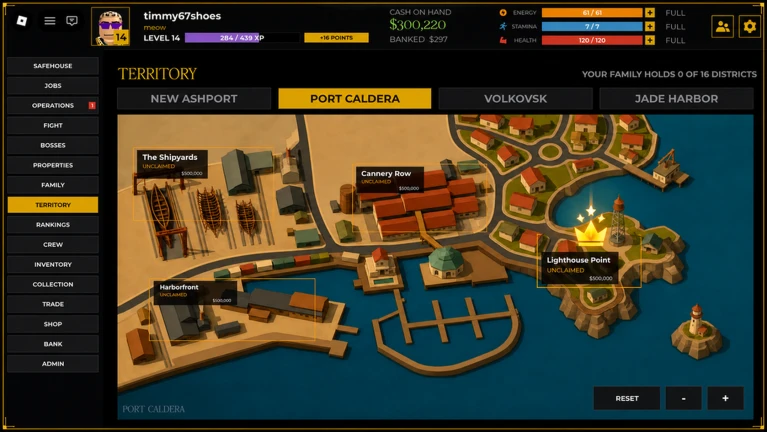
Features: UI-based automation that interacts directly with the on-screen buttons. Automatically detects and targets the highest available job in the list (Auto Job Highest). How to Use: Open the JOBS tab inside the game. Execute the script using your executor. Click the Auto Best Job: ON button to start.
-- [[ BloxScripts Risk Notice ]]
-- This script has not been verified by BloxScripts.fun. Deal with caution.
--
-- Stay safe:
--   • Never log in on unofficial Roblox sites or lookalike domains.
--   • Real Roblox links use roblox.com (check the .com ending).
--   • Treat fake Roblox login / "claim reward" pages as phishing.
-- [[ End BloxScripts Risk Notice ]]

-- Auto Best Job - Lightweight GUI (No External Libraries)
local ScreenGui = Instance.new("ScreenGui")
local Frame = Instance.new("Frame")
local TextButton = Instance.new("TextButton")
local UICorner = Instance.new("UICorner")

ScreenGui.Name = "AutoJobGui"
ScreenGui.Parent = game.CoreGui or game.Players.LocalPlayer:WaitForChild("PlayerGui")

Frame.Parent = ScreenGui
Frame.BackgroundColor3 = Color3.fromRGB(25, 25, 25)
Frame.Position = UDim2.new(0.05, 0, 0.4, 0)
Frame.Size = UDim2.new(0, 160, 0, 60)
Frame.Active = true
Frame.Draggable = true

TextButton.Parent = Frame
TextButton.BackgroundColor3 = Color3.fromRGB(200, 35, 35)
TextButton.Size = UDim2.new(0.9, 0, 0.7, 0)
TextButton.Position = UDim2.new(0.05, 0, 0.15, 0)
TextButton.Font = Enum.Font.SourceSansBold
TextButton.Text = "Auto Job: OFF"
TextButton.TextColor3 = Color3.fromRGB(255, 255, 255)
TextButton.TextSize = 18.000

local corner = Instance.new("UICorner")
corner.CornerRadius = UDim.new(0, 8)
corner.Parent = Frame

local cornerBtn = Instance.new("UICorner")
cornerBtn.CornerRadius = UDim.new(0, 6)
cornerBtn.Parent = TextButton

local autoJob = false

TextButton.MouseButton1Click:Connect(function()
    autoJob = not autoJob
    if autoJob then
        TextButton.Text = "Auto Job: ON"
        TextButton.BackgroundColor3 = Color3.fromRGB(35, 200, 35)
    else
        TextButton.Text = "Auto Job: OFF"
        TextButton.BackgroundColor3 = Color3.fromRGB(200, 35, 35)
    end
end)

-- الحلقة التلقائية للضغط على أفضل زر وظيفي متاح
task.spawn(function()
    while true do
        task.wait(0.2)
        if autoJob then
            pcall(function()
                local player = game.Players.LocalPlayer
                local pGui = player:FindFirstChild("PlayerGui")
                if pGui then
                    local targetBtn = nil
                    for _, v in pairs(pGui:GetDescendants()) do
                        if v:IsA("TextButton") and string.upper(v.Text) == "DO JOB" and v.Visible then
                            targetBtn = v
                        end
                    end

                    if targetBtn then
                        -- المحاكاة بالاعتماد على الفعاليات المباشرة
                        if VIM then
                            local VIM = game:GetService("VirtualInputManager")
                            VIM:SendMouseButtonEvent(targetBtn.AbsolutePosition.X + 10, targetBtn.AbsolutePosition.Y + 30, 0, true, game, 0)
                            VIM:SendMouseButtonEvent(targetBtn.AbsolutePosition.X + 10, targetBtn.AbsolutePosition.Y + 30, 0, false, game, 0)
                        elseif getconnections then
                            for _, conn in pairs(getconnections(targetBtn.MouseButton1Click)) do
                                conn:Fire()
                            end
                            for _, conn in pairs(getconnections(targetBtn.Activated)) do
                                conn:Fire()
                            end
                        end
                    end
                end
            end)
        end
    end
end)
Review the source before using it. Executions count successful copies, capped at 10 per user and network per script in 24 hours.
000000 Key System00Mobile Key System