
 Your community, in one place
 354 executions
 12,690 scripts
 115 users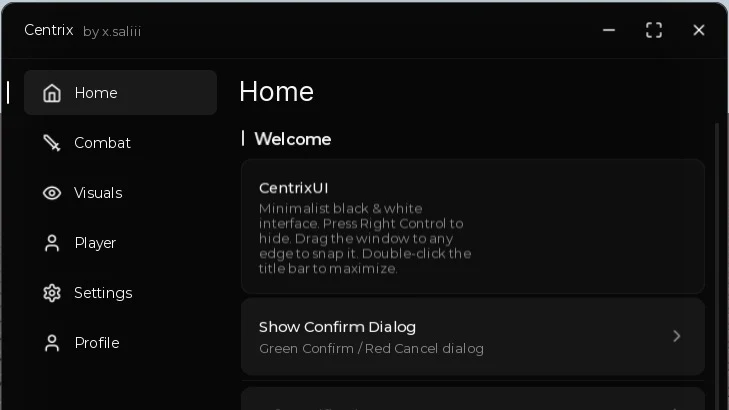
 Mobile Friendly

 Save
Save



 Follow
 Key System
M
Rose Hub🌹🌹
MaxLegendsOwnerThe owner of BloxScripts.fun.Early CreatorPublish a script as one of the first 100 accounts.·Universal
By munfialce · Rscripts
 BloxScripts.fun
[+] Create Window [+] Create Toggle [+] Create Button [+] Create Slider [+] Create Label [+] Create Paragraph and more
-- ═══════════════════════════════════════════════════════════════════════
-- CentrixUI v4.2.0 - Full Usage Example
-- ═══════════════════════════════════════════════════════════════════════

-- Load the library from GitHub raw URL
local CentrixUI = loadstring(game:HttpGet("https://raw.githubusercontent.com/xsaliii/clover/refs/heads/main/ui/CentrixUi.luau"))()

-- ═══════════════════════════════════════════════════════════════════════
-- Create the main window
-- ═══════════════════════════════════════════════════════════════════════
local Window = CentrixUI:CreateWindow({
    -- Window title (top-left text)
    Title = "Centrix",

    -- Subtitle shown right after the title (smaller, grey)
    SubTitle = "by x.saliii",

    -- Sidebar tab width in pixels (default 140)
    TabWidth = 140,

    -- Window size (default 580x460)
    Size = UDim2.fromOffset(580, 460),

    -- Theme: "Dark" or "Light"
    Theme = "Dark",

    -- Enable background blur effect (DepthOfFieldEffect)
    -- May be detectable by anti-cheats, set false to disable
    Acrylic = true,

    -- Key to hide/show the window (default RightControl)
    MinimizeKey = Enum.KeyCode.RightControl,

    -- Top-center floating image toggle button
    -- Accepts: asset id ("11351223"), rbxassetid://..., or full URL
    -- Downloads the image and caches it with getcustomasset
    -- Set to nil to disable the button
    Toggle_Image_Id = "https://github.com/xsaliii/clover/blob/main/assets/toggle_button_white.png?raw=true",

    -- Enable auto-save/load of all element values
    AutoSave = true,

    -- Folder name where config.txt is stored (in executor workspace)
    -- File path will be: Centrix/config.txt
    Foldername = "Centrix"
})

-- ═══════════════════════════════════════════════════════════════════════
-- HOME TAB
-- ═══════════════════════════════════════════════════════════════════════
local HomeTab = Window:AddTab({ Title = "Home", Icon = "lucide-home" })

-- Section: a titled group of elements inside a tab
local WelcomeSection = HomeTab:AddSection({ Title = "Welcome" })

local SectionLabel = WelcomeSection:AddLabel({
    Text = "Live Controls",
    Description = "These controls can be updated while the interface is running.",
    Icon = "sliders"
})

SectionLabel:SetLabel("Live Controls")

local sessionStart = os.clock()

task.spawn(function()
    while not Window.Destroyed do
        local seconds = math.floor(os.clock() - sessionStart)
        SectionLabel:SetLabel("Session Duration : " .. seconds)
        task.wait(1)
    end
end)

-- Paragraph: static text block (no interaction)
WelcomeSection:AddParagraph({
    Title = "CentrixUI",
    Content = "Minimalist black & white interface. Press Right Control to hide. Drag the window to any edge to snap it. Double-click the title bar to maximize."
})

-- Button: click to run callback
WelcomeSection:AddButton({
    Title = "Show Confirm Dialog",
    Description = "Green Confirm / Red Cancel dialog",
    Callback = function()
        Window:Dialog({
            Title = "Confirm Action",
            Content = "Do you want to enable all features at once?",
            Buttons = {
                -- "Confirm" auto-detected as green
                {
                    Title = "Confirm",
                    Callback = function()
                        CentrixUI:Notify({
                            Title = "Confirmed",
                            Content = "All features enabled.",
                            Type = "success",
                            Duration = 4
                        })
                    end
                },
                -- "Cancel" auto-detected as red
                { Title = "Cancel" }
            }
        })
    end
})

-- Divider: thin horizontal line
WelcomeSection:AddDivider()

-- Notification samples (4 types: info, success, warning, error)
WelcomeSection:AddButton({
    Title = "Info Notification",
    Callback = function()
        CentrixUI:Notify({
            Title = "Info",
            Content = "This is an informational message.",
            Type = "info",
            Duration = 4
        })
    end
})

WelcomeSection:AddButton({
    Title = "Success Notification",
    Callback = function()
        CentrixUI:Notify({
            Title = "Success",
            Content = "Operation completed successfully.",
            Type = "success",
            Duration = 4
        })
    end
})

WelcomeSection:AddButton({
    Title = "Warning Notification",
    Callback = function()
        CentrixUI:Notify({
            Title = "Warning",
            Content = "Something needs your attention.",
            Type = "warning",
            Duration = 4
        })
    end
})

WelcomeSection:AddButton({
    Title = "Error Notification",
    Callback = function()
        CentrixUI:Notify({
            Title = "Error",
            Content = "Something went wrong.",
            Type = "error",
            Duration = 4
        })
    end
})

-- ═══════════════════════════════════════════════════════════════════════
-- COMBAT TAB
-- ═══════════════════════════════════════════════════════════════════════
local CombatTab = Window:AddTab({ Title = "Combat", Icon = "lucide-sword" })

local AimbotSection = CombatTab:AddSection({ Title = "Aimbot" })

-- Toggle: ON = green track + white knob, OFF = grey
AimbotSection:AddToggle({
    Title = "Enable Aimbot",
    Description = "Automatically aims at the nearest target",
    Default = false,
    Callback = function(value)
        print("Aimbot:", value)
    end
})

-- Slider with editable text field next to it
AimbotSection:AddSlider({
    Title = "FOV",
    Description = "Field of view for target detection",
    Min = 10,
    Max = 360,
    Default = 90,
    Rounding = 0,
    Callback = function(value)
        print("FOV:", value)
    end
})

AimbotSection:AddSlider({
    Title = "Smoothness",
    Description = "How smoothly the camera follows",
    Min = 0,
    Max = 1,
    Default = 0.5,
    Rounding = 2,
    Callback = function(value)
        print("Smoothness:", value)
    end
})

-- Single-select dropdown
AimbotSection:AddDropdown({
    Title = "Target Part",
    Description = "Which body part to aim at",
    Values = { "Head", "Torso", "UpperTorso", "LowerTorso", "HumanoidRootPart" },
    Default = "Head",
    Callback = function(value)
        print("Target part:", value)
    end
})

-- Searchable dropdown (auto-adds search bar when > 15 items)
AimbotSection:AddDropdown({
    Title = "Weapon Class",
    Description = "Searchable weapon list",
    Values = {
        "Assault Rifle", "Battle Rifle", "SMG", "Shotgun", "LMG",
        "Sniper Rifle", "DMR", "Pistol", "Revolver", "Grenade Launcher",
        "Rocket Launcher", "Flamethrower", "Minigun", "Crossbow", "Bow",
        "Railgun", "Laser Rifle", "Plasma Cannon", "Rail Pistol", "Tesla Coil"
    },
    Default = "Assault Rifle",
    Callback = function(value)
        print("Weapon:", value)
    end
})

-- Keybind: click the key button, then press a key to bind
AimbotSection:AddKeybind({
    Title = "Aim Key",
    Description = "Hold or toggle aim",
    Default = Enum.KeyCode.E,
    Mode = "Hold", -- "Toggle" or "Hold" or "Always"
    Callback = function(toggled)
        print("Aiming:", toggled)
    end
})

local TeamSection = CombatTab:AddSection({ Title = "Team Check" })

TeamSection:AddToggle({
    Title = "Ignore Teammates",
    Default = true,
    Callback = function(value) end
})

TeamSection:AddToggle({
    Title = "Ignore Friends",
    Default = true,
    Callback = function(value) end
})

-- Multi-select dropdown
TeamSection:AddDropdown({
    Title = "Priority",
    Description = "Pick multiple priorities",
    Values = { "Closest", "Lowest Health", "Highest Threat", "In FOV" },
    Default = { "Closest", "In FOV" },
    Multi = true,
    Callback = function(values)
        for name, _ in pairs(values) do
            print("Priority:", name)
        end
    end
})

-- ═══════════════════════════════════════════════════════════════════════
-- VISUALS TAB
-- ═══════════════════════════════════════════════════════════════════════
local VisualsTab = Window:AddTab({ Title = "Visuals", Icon = "lucide-eye" })

local ESPSection = VisualsTab:AddSection({ Title = "ESP" })

ESPSection:AddToggle({
    Title = "Enable ESP",
    Description = "Draw boxes around players",
    Default = false,
    Callback = function(value) end
})

-- Color picker with SV square, hue bar, alpha bar, hex + RGB inputs
ESPSection:AddColorpicker({
    Title = "ESP Color",
    Description = "Highlight color for targets",
    Default = Color3.fromRGB(255, 255, 255),
    Transparency = 0,
    Callback = function(color)
        print("Color:", color)
    end
})

ESPSection:AddSlider({
    Title = "ESP Thickness",
    Description = "Line thickness in pixels",
    Min = 1,
    Max = 5,
    Default = 2,
    Rounding = 0,
    Callback = function(value) end
})

ESPSection:AddDropdown({
    Title = "ESP Style",
    Values = { "Box", "Corner", "Circle", "Glow", "Outline" },
    Default = "Box",
    Callback = function(value) end
})

local WorldSection = VisualsTab:AddSection({ Title = "World" })

WorldSection:AddToggle({
    Title = "Fullbright",
    Description = "Illuminate the entire map",
    Default = false,
    Callback = function(value)
        if value then
            game.Lighting.Ambient = Color3.fromRGB(178, 178, 178)
            game.Lighting.OutdoorAmbient = Color3.fromRGB(178, 178, 178)
            game.Lighting.Brightness = 3
        else
            game.Lighting.Ambient = Color3.fromRGB(70, 70, 70)
            game.Lighting.OutdoorAmbient = Color3.fromRGB(70, 70, 70)
            game.Lighting.Brightness = 2
        end
    end
})

WorldSection:AddToggle({
    Title = "Remove Fog",
    Description = "Clear atmospheric fog",
    Default = false,
    Callback = function(value)
        game.Lighting.FogEnd = value and 100000 or 10000
    end
})

-- ═══════════════════════════════════════════════════════════════════════
-- PLAYER TAB
-- ═══════════════════════════════════════════════════════════════════════
local PlayerTab = Window:AddTab({ Title = "Player", Icon = "lucide-user" })

local MovementSection = PlayerTab:AddSection({ Title = "Movement" })

MovementSection:AddSlider({
    Title = "Walk Speed",
    Description = "Change your walking speed",
    Min = 16,
    Max = 200,
    Default = 16,
    Rounding = 0,
    Callback = function(value)
        local char = game.Players.LocalPlayer.Character
        if char and char:FindFirstChildOfClass("Humanoid") then
            char:FindFirstChildOfClass("Humanoid").WalkSpeed = value
        end
    end
})

MovementSection:AddSlider({
    Title = "Jump Power",
    Description = "Change your jump height",
    Min = 50,
    Max = 300,
    Default = 50,
    Rounding = 0,
    Callback = function(value)
        local char = game.Players.LocalPlayer.Character
        if char and char:FindFirstChildOfClass("Humanoid") then
            char:FindFirstChildOfClass("Humanoid").JumpPower = value
        end
    end
})

MovementSection:AddToggle({
    Title = "Infinite Jump",
    Description = "Jump repeatedly in mid-air",
    Default = false,
    Callback = function(value)
        if value then
            _G.CentrixInfJump = true
            game:GetService("UserInputService").JumpRequest:Connect(function()
                if _G.CentrixInfJump then
                    local char = game.Players.LocalPlayer.Character
                    if char and char:FindFirstChildOfClass("Humanoid") then
                        char:FindFirstChildOfClass("Humanoid"):ChangeState("Jumping")
                    end
                end
            end)
        else
            _G.CentrixInfJump = false
        end
    end
})

local InfoSection = PlayerTab:AddSection({ Title = "Customization" })

InfoSection:AddInput({
    Title = "Nickname",
    Description = "Custom display name",
    Default = "",
    Placeholder = "Enter a nickname...",
    Callback = function(value)
        print("Nickname:", value)
    end
})

InfoSection:AddInput({
    Title = "Speed Multiplier",
    Description = "Numeric only",
    Default = "1",
    Placeholder = "e.g. 1.5",
    Numeric = true,
    Callback = function(value)
        print("Multiplier:", value)
    end
})

-- ═══════════════════════════════════════════════════════════════════════
-- SETTINGS TAB
-- ═══════════════════════════════════════════════════════════════════════
local SettingsTab = Window:AddTab({ Title = "Settings", Icon = "lucide-settings" })

local UISection = SettingsTab:AddSection({ Title = "UI Settings" })

UISection:AddButton({
    Title = "Switch Theme",
    Description = "Toggle between Dark and Light",
    Callback = function()
        local current = CentrixUI:GetTheme()
        CentrixUI:SetTheme(current == "Dark" and "Light" or "Dark")
        CentrixUI:Notify({
            Title = "Theme Changed",
            Content = "Now using " .. CentrixUI:GetTheme() .. " theme",
            Type = "info",
            Duration = 3
        })
    end
})

UISection:AddToggle({
    Title = "Auto Save",
    Description = "Save settings to file automatically",
    Default = true,
    Callback = function(value)
        -- Update the live AutoSave flag
        Window.AutoSave = value
    end
})

UISection:AddButton({
    Title = "Reset Config",
    Description = "Clear the saved config file",
    Callback = function()
        local ok = CentrixUI:ResetConfig(Window.FolderName)
        CentrixUI:Notify({
            Title = ok and "Config Reset" or "Config Error",
            Content = ok and "Configuration has been cleared." or "Could not write to file.",
            Type = ok and "warning" or "error",
            Duration = 4
        })
    end
})

UISection:AddButton({
    Title = "Minimize Window",
    Description = "Hide the UI (press RightControl to show)",
    Callback = function()
        Window:Minimize()
    end
})

UISection:AddButton({
    Title = "Maximize Window",
    Description = "Toggle fullscreen size",
    Callback = function()
        Window:Maximize(not Window.Maximized)
    end
})

local DangerSection = SettingsTab:AddSection({ Title = "Actions" })

DangerSection:AddButton({
    Title = "Unload Interface",
    Description = "Destroy the UI completely",
    Callback = function()
        Window:Destroy()
    end
})

-- ═══════════════════════════════════════════════════════════════════════
-- INITIALIZE
-- ═══════════════════════════════════════════════════════════════════════

-- Select the first tab
Window:SelectTab(1)

local LiveParagraph = UISection:AddParagraph({
    Title = "Live Status",
    Content = "This paragraph can be updated while the interface is running.",
    Icon = "activity"
})

local RefreshableDropdown = UISection:AddDropdown({
    Title = "Server Region",
    Description = "The available regions can be refreshed at runtime.",
    Icon = "globe-2",
    Values = { "Asia", "Europe", "North America" },
    Default = "Asia",
    Callback = function(value)
        print("Server region:", value)
    end
})

LiveParagraph:UpdateParagraph("Live Status", "The interface is ready and the server list is loaded.")
RefreshableDropdown:Refresh({ "Asia", "Europe", "North America", "South America" }, "Asia")

task.delay(3, function()
    LiveParagraph:SetContent("The server list can be replaced without rebuilding the entire UI.")
    RefreshableDropdown:Refresh({ "Asia", "Europe", "North America" }, "Europe")
end)

task.delay(6, function()
    RefreshableDropdown:Reset()
end)

local ProfileTab = Window:AddTab({
    Title = "Profile",
    Icon = "user"
})

local Profile = ProfileTab:AddSection({
    Title = "Profile Settings"
})

Profile:AddInput({
    Title = "Username",
    Description = "Set the name used by your profile.",
    Icon = "user-round",
    Default = "Player",
    Callback = function(value)
        print("Username:", value)
    end
})

Profile:AddDropdown({
    Title = "Status",
    Description = "Choose the status shown to other users.",
    Icon = "circle-user-round",
    Values = { "Online", "Away", "Busy", "Invisible" },
    Default = "Online",
    Callback = function(value)
        print("Status:", value)
    end
})

Profile:AddToggle({
    Title = "Public Profile",
    Description = "Allow other users to view your profile details.",
    Icon = "eye",
    Default = false,
    Callback = function(enabled)
        print("Public profile:", enabled)
    end
})

-- Welcome notification
CentrixUI:Notify({
    Title = "CentrixUI",
    Content = "Interface loaded successfully.",
    Type = "success",
    Duration = 4
})
Review the source before using it. Executions count successful copies, capped at 10 per user and network per script in 24 hours.
 00Mobile
 00Mobile
 00
00