
 Your community, in one place
 956 executions
 22,798 scripts
 541 users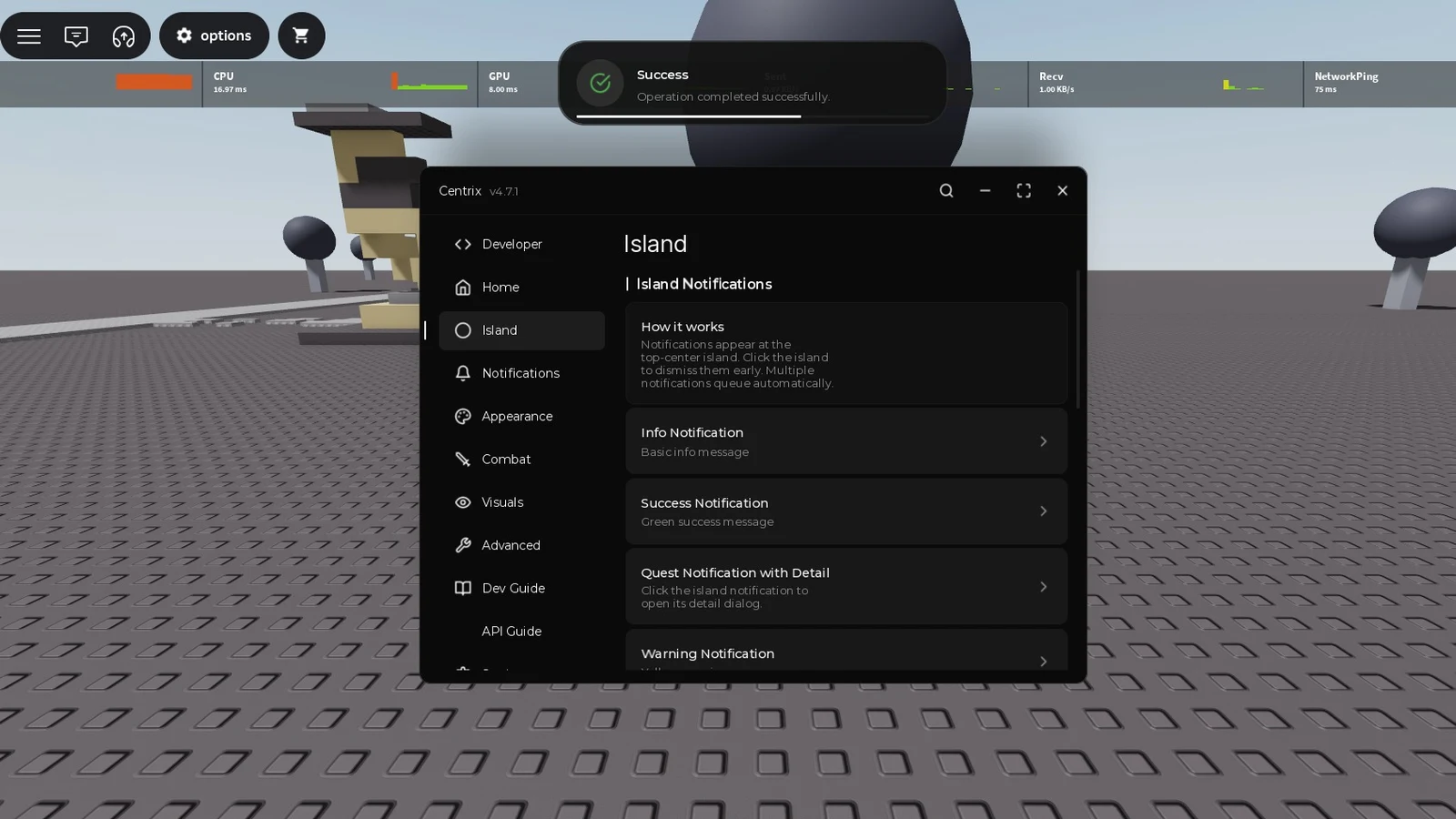
 Mobile Friendly

 Save
Save



 Follow
 Creator Discord
M
Aetherist Loader
MaxLegendsOwnerThe owner of BloxScripts.fun.Early CreatorPublish a script as one of the first 100 accounts.·Universal
By thedudewhotalks · Rscripts
 BloxScripts.fun
[+] Create Window [+] Create Toggle [+] Create Button [+] Create Slider [+] Create Label [+] Create Paragraph and more
local CentrixUI = loadstring(game:HttpGet("https://raw.githubusercontent.com/xsaliii/clover/refs/heads/main/ui/CentrixUi.luau"))()
local DevTools
do
local ok, result = pcall(function()
return loadstring(game:HttpGet("https://raw.githubusercontent.com/xsaliii/clover/refs/heads/main/ui/CentrixUI_DevTools.lua"))()
end)
if ok and type(result) == "table" then
DevTools = result
else
warn("[Example] Could not load DevTools: " .. tostring(result))
end
end
-- ═══════════════════════════════════════════════════════════════════════
-- STEP 2: CREATE WINDOW / ขั้นตอนที่ 2: สร้างหน้าต่างหลัก
-- ═══════════════════════════════════════════════════════════════════════
local Window = CentrixUI:CreateWindow({
-- English: Title shown in the top-left corner.
-- ไทย: ชื่อเรื่องที่แสดงมุมซ้ายบน
Title = "Centrix",
-- English: Subtitle displayed next to the title (smaller, grey).
-- ไทย: คำอธิบายย่อยที่แสดงข้างชื่อ (ตัวเล็ก สีเทา)
SubTitle = "v4.7.1",
-- English: Sidebar width in pixels (default 160).
-- ไทย: ความกว้างของแถบแท็บด้านซ้าย (เริ่มต้น 160)
TabWidth = 160,
-- English: Initial window size.
-- ไทย: ขนาดหน้าต่างเริ่มต้น
Size = UDim2.fromOffset(620, 480),
-- English: Theme = "Dark" | "Light".
-- ไทย: ธีม = "Dark" | "Light"
Theme = "Dark",
-- English: Blur effect behind the window.
-- ไทย: เอฟเฟกต์เบลอหลังหน้าต่าง
Acrylic = true,
-- English: Hotkey to hide/show the window (default RightControl).
-- ไทย: ปุ่มลัดซ่อน/แสดงหน้าต่าง (เริ่มต้น RightControl)
MinimizeKey = Enum.KeyCode.RightControl,
-- English: Auto-save all element values to disk.
-- ไทย: บันทึกค่าของ element ทั้งหมดลงดิสก์อัตโนมัติ
AutoSave = true,
-- English: Folder name for config.txt and presets.
-- ไทย: ชื่อโฟลเดอร์สำหรับ config.txt และ presets
Foldername = "Centrix",
})
-- ═══════════════════════════════════════════════════════════════════════
-- STEP 3: ENABLE DEVTOOLS (Code Editor + Console)
-- ขั้นตอนที่ 3: เปิด DevTools (Code Editor + Console)
-- ═══════════════════════════════════════════════════════════════════════
-- English: This adds a "Developer" tab with a code editor and a console
-- that hooks print/warn. Call this AFTER CreateWindow.
-- ไทย: เพิ่มแท็บ "Developer" พร้อม Code Editor และ Console ที่ hook
-- print/warn ไว้ ต้องเรียกหลัง CreateWindow เท่านั้น
if DevTools and type(DevTools.Install) == "function" then
DevTools.Install(CentrixUI, Window)
else
warn("[Example] DevTools not available — Developer tab will be missing.")
end
-- ═══════════════════════════════════════════════════════════════════════
-- STEP 4: ENABLE DYNAMIC ISLAND / ขั้นตอนที่ 4: เปิด Dynamic Island
-- ═══════════════════════════════════════════════════════════════════════
-- English: Top-center pill — toggle UI + animated notifications.
-- ไทย: กระเปาะกลางจอด้านบน — toggle UI + แจ้งเตือนแบบแอนิเมชัน
Window:EnableIsland({
YOffset = 40,
OpenText = "open",
CloseText = "close",
CompactWidth = 90,
CompactHeight = 32,
ExpandedWidth = 360,
ExpandedHeight = 76,
Duration = 4,
})
-- ═══════════════════════════════════════════════════════════════════════
-- STEP 5: ENABLE SEARCH BAR (Ctrl+K) / ขั้นตอนที่ 5: เปิด Search Bar
-- ═══════════════════════════════════════════════════════════════════════
Window:EnableSearch({
Keybind = Enum.KeyCode.K
})
Window:RegisterSearchEntry({
Name = "Toggle Fullbright",
Category = "Commands",
Icon = "lucide-sun",
Callback = function()
local lighting = game:GetService("Lighting")
if lighting.Brightness > 2 then
lighting.Ambient = Color3.fromRGB(70, 70, 70)
lighting.Brightness = 2
Window:Notify({ Title = "Fullbright OFF", Type = "info", Duration = 2 })
else
lighting.Ambient = Color3.fromRGB(178, 178, 178)
lighting.Brightness = 3
Window:Notify({ Title = "Fullbright ON", Type = "success", Duration = 2 })
end
end
})
Window:RegisterSearchEntry({
Name = "Test Island Notification",
Category = "Commands",
Icon = "lucide-bell",
Callback = function()
Window:IslandNotify({
Title = "Island Notify",
Content = "Triggered from command palette.",
Type = "success",
Icon = "lucide-check-circle",
Duration = 4
})
end
})
Window:RegisterSearchEntry({
Name = "Open Developer Tab",
Category = "Commands",
Icon = "lucide-code",
Callback = function()
if Window._DevToolsTab then
Window:SelectTab(Window._DevToolsTab.Index)
else
Window:Notify({ Title = "DevTools not loaded", Type = "error", Duration = 3 })
end
end
})
-- ═══════════════════════════════════════════════════════════════════════
-- TAB: HOME / แท็บ: HOME
-- ═══════════════════════════════════════════════════════════════════════
local HomeTab = Window:AddTab({ Title = "Home", Icon = "lucide-home" })
local WelcomeSection = HomeTab:AddSection({ Title = "Welcome" })
local SessionLabel = WelcomeSection:AddLabel({
Text = "Live Controls",
Description = "These controls can be updated while the interface is running.",
Icon = "sliders"
})
local sessionStart = os.clock()
task.spawn(function()
while not Window.Destroyed do
local seconds = math.floor(os.clock() - sessionStart)
SessionLabel:SetLabel("Session Duration : " .. seconds)
task.wait(1)
end
end)
WelcomeSection:AddParagraph({
Title = "CentrixUI v4.7.1",
Content = "Press RightControl to hide. Press Ctrl+K to search. Open the Developer tab to test the Code Editor."
})
WelcomeSection:AddButton({
Title = "Open Developer Tab",
Description = "Jump to the Code Editor / Console",
Icon = "lucide-code",
Callback = function()
if Window._DevToolsTab then
Window:SelectTab(Window._DevToolsTab.Index)
else
Window:Notify({ Title = "DevTools not loaded", Type = "error", Duration = 3 })
end
end
})
WelcomeSection:AddButton({
Title = "Show Confirm Dialog",
Description = "Green Confirm / Red Cancel dialog",
Callback = function()
Window:Dialog({
Title = "Confirm Action",
Content = "Do you want to enable all features at once?",
Buttons = {
{ Title = "Confirm", Callback = function()
Window:Notify({
Title = "Confirmed",
Content = "All features enabled.",
Type = "success",
Duration = 4
})
end },
{ Title = "Cancel" }
}
})
end
})
-- ═══════════════════════════════════════════════════════════════════════
-- TAB: ISLAND / แท็บ: ISLAND
-- ═══════════════════════════════════════════════════════════════════════
local IslandTab = Window:AddTab({ Title = "Island", Icon = "lucide-circle" })
local IslandToastSection = IslandTab:AddSection({ Title = "Island Notifications" })
IslandToastSection:AddParagraph({
Title = "How it works",
Content = "Notifications appear at the top-center island. Click the island to dismiss them early. Multiple notifications queue automatically."
})
IslandToastSection:AddButton({
Title = "Info Notification",
Description = "Basic info message",
Callback = function()
Window:IslandNotify({
Title = "Information",
Content = "This is an info island notification.",
Type = "info",
Duration = 4
})
end
})
IslandToastSection:AddButton({
Title = "Success Notification",
Description = "Green success message",
Callback = function()
Window:IslandNotify({
Title = "Success",
Content = "Operation completed successfully.",
Type = "success",
Duration = 4
})
end
})
IslandToastSection:AddButton({
Title = "Quest Notification with Detail",
Description = "Click the island notification to open its detail dialog.",
Callback = function()
Window:IslandNotify({
Title = "You have Finished Your Quest",
Content = "Quest completed successfully.",
Detail = "After farming for xxx, you already obtained God Sword.",
Type = "success",
Icon = "lucide-trophy",
Duration = 8,
Buttons = {
{ Title = "Awesome" },
{ Title = "Later", Callback = function()
Window:Notify({ Title = "Reminder set", Type = "info", Duration = 2 })
end }
}
})
end
})
IslandToastSection:AddButton({
Title = "Warning Notification",
Description = "Yellow warning message",
Callback = function()
Window:IslandNotify({
Title = "Warning",
Content = "Something needs your attention.",
Type = "warning",
Duration = 4
})
end
})
IslandToastSection:AddButton({
Title = "Error Notification",
Description = "Red error message",
Callback = function()
Window:IslandNotify({
Title = "Error",
Content = "Something went wrong.",
Type = "error",
Duration = 4
})
end
})
local IslandIconSection = IslandTab:AddSection({ Title = "Custom Icons" })
IslandIconSection:AddButton({
Title = "Lucide Icon",
Description = "Auto-tinted by type",
Callback = function()
Window:IslandNotify({
Title = "Star Icon",
Content = "Lucide icon tinted by type.",
Type = "success",
Icon = "lucide-star",
Duration = 4
})
end
})
IslandIconSection:AddButton({
Title = "rbxassetid Icon",
Description = "Roblox asset (no tint)",
Callback = function()
Window:IslandNotify({
Title = "Roblox Asset",
Content = "Loaded from rbxassetid.",
Type = "info",
Icon = "rbxassetid://135739238",
Duration = 4
})
end
})
IslandIconSection:AddButton({
Title = "Custom URL Icon",
Description = "Downloaded via getcustomasset",
Callback = function()
Window:IslandNotify({
Title = "Remote Icon",
Content = "Fetched from CDN and cached.",
Type = "warning",
Icon = "https://raw.githubusercontent.com/lucide-icons/lucide/main/icons/zap.png",
Duration = 5
})
end
})
IslandIconSection:AddButton({
Title = "Custom Color Override",
Description = "Override the tint",
Callback = function()
Window:IslandNotify({
Title = "Pink Heart",
Content = "IconColor override applied.",
Type = "info",
Icon = "lucide-heart",
IconColor = Color3.fromRGB(255, 100, 200),
Duration = 4
})
end
})
IslandIconSection:AddButton({
Title = "Sticky Notification",
Description = "Duration 0 = never auto-closes",
Callback = function()
Window:IslandNotify({
Title = "Sticky",
Content = "Click the island to dismiss.",
Type = "info",
Icon = "lucide-pin",
Duration = 0
})
end
})
IslandIconSection:AddButton({
Title = "Queue Test (3 at once)",
Description = "Test notification queue",
Callback = function()
for i = 1, 3 do
Window:IslandNotify({
Title = "Notification " .. i,
Content = "Queued message number " .. i,
Type = i == 1 and "info" or (i == 2 and "success" or "warning"),
Duration = 3
})
end
end
})
local IslandControlSection = IslandTab:AddSection({ Title = "Island Controls" })
IslandControlSection:AddToggle({
Title = "Island Visible",
Description = "Show/hide the island entirely",
Default = true,
Callback = function(enabled)
Window:SetIslandVisible(enabled)
end
})
IslandControlSection:AddButton({
Title = "Trigger via CentrixUI",
Description = "Uses CentrixUI:IslandNotify() global method",
Callback = function()
CentrixUI:IslandNotify({
Title = "Global Method",
Content = "Called via CentrixUI:IslandNotify()",
Type = "success",
Duration = 3
})
end
})
-- ═══════════════════════════════════════════════════════════════════════
-- TAB: NOTIFICATIONS / แท็บ: NOTIFICATIONS
-- ═══════════════════════════════════════════════════════════════════════
local NotifTab = Window:AddTab({ Title = "Notifications", Icon = "lucide-bell" })
local ToastSection = NotifTab:AddSection({ Title = "Toast Notifications" })
ToastSection:AddButton({
Title = "Info",
Callback = function()
Window:Notify({ Title = "Info", Content = "Informational message.", Type = "info", Duration = 4 })
end
})
ToastSection:AddButton({
Title = "Success",
Callback = function()
Window:Notify({ Title = "Success", Content = "Operation complete.", Type = "success", Duration = 4 })
end
})
ToastSection:AddButton({
Title = "Warning",
Callback = function()
Window:Notify({ Title = "Warning", Content = "Needs attention.", Type = "warning", Duration = 4 })
end
})
ToastSection:AddButton({
Title = "Error",
Callback = function()
Window:Notify({ Title = "Error", Content = "Something went wrong.", Type = "error", Duration = 4 })
end
})
local DialogSection = NotifTab:AddSection({ Title = "Notify Dialog (Modal)" })
DialogSection:AddButton({
Title = "Simple Dialog",
Callback = function()
Window:NotifyDialog({
Title = "Heads Up",
Content = "This is a notification shown as a modal dialog.",
Type = "info",
Buttons = { { Title = "OK" } }
})
end
})
DialogSection:AddButton({
Title = "Confirm Dialog",
Callback = function()
Window:NotifyDialog({
Title = "Delete Preset?",
Content = "This action cannot be undone.",
Type = "warning",
Buttons = {
{ Title = "Delete", Callback = function()
Window:Notify({ Title = "Deleted", Type = "error", Duration = 2 })
end },
{ Title = "Cancel" }
}
})
end
})
DialogSection:AddButton({
Title = "Dialog with Icon",
Callback = function()
Window:NotifyDialog({
Title = "Achievement!",
Content = "You unlocked a new feature.",
Icon = "lucide-trophy",
IconColor = Color3.fromRGB(255, 200, 50),
Buttons = {
{ Title = "View", Callback = function()
Window:Notify({ Title = "Coming soon", Type = "info", Duration = 2 })
end },
{ Title = "Dismiss" }
}
})
end
})
-- ═══════════════════════════════════════════════════════════════════════
-- TAB: APPEARANCE / แท็บ: APPEARANCE
-- ═══════════════════════════════════════════════════════════════════════
local AppearanceTab = Window:AddTab({ Title = "Appearance", Icon = "lucide-palette" })
local ThemeSection = AppearanceTab:AddSection({ Title = "Theme", Collapsible = true })
ThemeSection:AddDropdown({
Title = "Preset Theme",
Values = { "Dark", "Light" },
Default = "Dark",
Callback = function(value)
CentrixUI:SetTheme(value)
end
})
ThemeSection:AddButton({
Title = "Open Theme Editor",
Description = "Live-edit theme colors",
Icon = "lucide-palette",
Callback = function()
Window:OpenThemeEditor()
end
})
ThemeSection:AddButton({
Title = "Random Accent Color",
Icon = "lucide-sparkles",
Callback = function()
CentrixUI:SetAccentColor(Color3.fromHSV(math.random(), 0.7, 0.95))
Window:Notify({ Title = "Accent Changed", Type = "success", Duration = 2 })
end
})
ThemeSection:AddButton({
Title = "Reset Overrides",
Callback = function()
CentrixUI:ResetThemeOverride(nil)
Window:Notify({ Title = "Reset", Type = "info", Duration = 2 })
end
})
local WindowSection = AppearanceTab:AddSection({ Title = "Window Controls" })
WindowSection:AddSlider({
Title = "Window Opacity",
Min = 0,
Max = 1,
Default = 1,
Rounding = 2,
Callback = function(value)
Window:SetOpacity(value)
end
})
WindowSection:AddSlider({
Title = "UI Scale",
Min = 0.7,
Max = 1.5,
Default = 1,
Rounding = 2,
Callback = function(value)
Window:SetScale(value)
end
})
WindowSection:AddToggle({
Title = "Allow Dragging",
Default = true,
Callback = function(enabled)
Window:SetDraggable(enabled)
end
})
WindowSection:AddToggle({
Title = "Allow Resizing",
Default = true,
Callback = function(enabled)
Window:SetResizable(enabled)
end
})
local PresetSection = AppearanceTab:AddSection({ Title = "Presets" })
local presetNameInput = PresetSection:AddInput({
Title = "Preset Name",
Placeholder = "e.g. PVP",
Finished = true,
Callback = function() end
})
local presetDropdown
local function refreshPresetList()
local list = Window:ListPresets()
if #list == 0 then list = { "(no presets)" } end
if presetDropdown then presetDropdown:Refresh(list) end
end
presetDropdown = PresetSection:AddDropdown({
Title = "Load Preset",
Values = Window:ListPresets(),
Callback = function(name)
local ok, msg = Window:LoadPreset(name)
Window:Notify({
Title = ok and "Preset Loaded" or "Failed",
Content = msg or "",
Type = ok and "success" or "error",
Duration = 3
})
end
})
PresetSection:AddButton({
Title = "Save Current as Preset",
Icon = "lucide-save",
Callback = function()
local name = presetNameInput:GetValue()
if name == "" then
Window:Notify({ Title = "Error", Content = "Enter a preset name first.", Type = "error", Duration = 3 })
return
end
local ok, msg = Window:SavePreset(name)
Window:Notify({
Title = ok and "Saved" or "Failed",
Content = msg or "",
Type = ok and "success" or "error",
Duration = 3
})
refreshPresetList()
end
})
PresetSection:AddButton({
Title = "Delete Selected Preset",
Icon = "lucide-trash-2",
Callback = function()
local name = presetNameInput:GetValue()
if name == "" then
Window:Notify({ Title = "Preset Name Required", Type = "warning", Duration = 3 })
return
end
local success, deleted = Window:DeletePreset(name)
local ok = success and deleted
Window:Notify({
Title = ok and "Preset Deleted" or "Delete Failed",
Content = ok and ("Deleted preset " .. name) or "The preset could not be deleted in this runtime.",
Type = ok and "success" or "warning",
Duration = 3
})
refreshPresetList()
end
})
-- ═══════════════════════════════════════════════════════════════════════
-- TAB: COMBAT / แท็บ: COMBAT
-- ═══════════════════════════════════════════════════════════════════════
local CombatTab = Window:AddTab({ Title = "Combat", Icon = "lucide-sword" })
local AimbotSection = CombatTab:AddSection({ Title = "Aimbot" })
AimbotSection:AddToggle({
Title = "Enable Aimbot",
Description = "Automatically aims at nearest target",
Default = false,
Callback = function(value) print("Aimbot:", value) end
})
AimbotSection:AddSlider({
Title = "FOV",
Description = "Field of view for target detection",
Min = 10,
Max = 360,
Default = 90,
Callback = function(value) print("FOV:", value) end
})
AimbotSection:AddSlider({
Title = "Smoothness",
Min = 0,
Max = 1,
Default = 0.5,
Rounding = 2,
Callback = function(value) print("Smoothness:", value) end
})
AimbotSection:AddDropdown({
Title = "Target Part",
Values = { "Head", "Torso", "UpperTorso", "LowerTorso", "HumanoidRootPart" },
Default = "Head",
Callback = function(value) print("Target:", value) end
})
AimbotSection:AddKeybind({
Title = "Aim Key",
Default = Enum.KeyCode.E,
Mode = "Hold",
Callback = function(toggled) print("Aiming:", toggled) end
})
local TeamSection = CombatTab:AddSection({ Title = "Team Check", Collapsible = true })
TeamSection:AddToggle({ Title = "Ignore Teammates", Default = true, Callback = function() end })
TeamSection:AddToggle({ Title = "Ignore Friends", Default = true, Callback = function() end })
TeamSection:AddDropdown({
Title = "Priority",
Values = { "Closest", "Lowest Health", "Highest Threat", "In FOV" },
Default = { "Closest", "In FOV" },
Multi = true,
Callback = function(values)
for name in pairs(values) do print("Priority:", name) end
end
})
-- ═══════════════════════════════════════════════════════════════════════
-- TAB: VISUALS / แท็บ: VISUALS
-- ═══════════════════════════════════════════════════════════════════════
local VisualsTab = Window:AddTab({ Title = "Visuals", Icon = "lucide-eye" })
local ESPSection = VisualsTab:AddSection({ Title = "ESP" })
ESPSection:AddToggle({
Title = "Enable ESP",
Default = false,
Callback = function() end
})
ESPSection:AddColorpicker({
Title = "ESP Color",
Default = Color3.fromRGB(255, 255, 255),
Transparency = 0,
Callback = function(c) print("Color:", c) end
})
ESPSection:AddSlider({
Title = "ESP Thickness",
Min = 1,
Max = 5,
Default = 2,
Callback = function() end
})
ESPSection:AddDropdown({
Title = "ESP Style",
Values = { "Box", "Corner", "Circle", "Glow", "Outline" },
Default = "Box",
Callback = function() end
})
local WorldSection = VisualsTab:AddSection({ Title = "World" })
WorldSection:AddToggle({
Title = "Fullbright",
Default = false,
Callback = function(value)
local l = game:GetService("Lighting")
if value then
l.Ambient = Color3.fromRGB(178, 178, 178)
l.OutdoorAmbient = Color3.fromRGB(178, 178, 178)
l.Brightness = 3
else
l.Ambient = Color3.fromRGB(70, 70, 70)
l.OutdoorAmbient = Color3.fromRGB(70, 70, 70)
l.Brightness = 2
end
end
})
WorldSection:AddToggle({
Title = "Remove Fog",
Default = false,
Callback = function(value)
game:GetService("Lighting").FogEnd = value and 100000 or 10000
end
})
-- ═══════════════════════════════════════════════════════════════════════
-- TAB: ADVANCED / แท็บ: ADVANCED
-- ═══════════════════════════════════════════════════════════════════════
local AdvancedTab = Window:AddTab({ Title = "Advanced", Icon = "lucide-wrench" })
local CollapsibleSection = AdvancedTab:AddSection({
Title = "Click Header to Collapse",
Collapsible = true,
Collapsed = false
})
CollapsibleSection:AddParagraph({
Title = "How it works",
Content = "Click the section title above to collapse. The chevron icon toggles between up (expanded) and down (collapsed)."
})
CollapsibleSection:AddButton({
Title = "Collapse From Code",
Callback = function()
CollapsibleSection:SetCollapsed(true)
end
})
local StartCollapsed = AdvancedTab:AddSection({
Title = "Starts Collapsed",
Collapsible = true,
Collapsed = true
})
StartCollapsed:AddLabel({
Text = "Surprise!",
Description = "You found the hidden content by clicking the header."
})
local LayoutSection = AdvancedTab:AddSection({ Title = "Layout Helpers" })
LayoutSection:AddParagraph({
Title = "Divider and Spacer",
Content = "AddDivider draws a theme-aware separator. AddSpacer inserts a configurable vertical gap."
})
local layoutDivider = LayoutSection:AddDivider()
local smallSpacer = LayoutSection:AddSpacer(8)
LayoutSection:AddSpacer(20)
LayoutSection:AddLabel({
Text = "After 20px spacer",
Description = "Notice the extra gap above"
})
LayoutSection:AddParagraph({
Title = "AddRow",
Content = "Horizontal row with raw frames"
})
local row = LayoutSection:AddRow({ Padding = 8 })
row.AddFrame({
BackgroundColor3 = Color3.fromRGB(34, 197, 94),
BackgroundTransparency = 0.5,
Size = UDim2.new(0.5, -4, 0, 40)
})
row.AddFrame({
BackgroundColor3 = Color3.fromRGB(239, 68, 68),
BackgroundTransparency = 0.5,
Size = UDim2.new(0.5, -4, 0, 40)
})
local customFrame = LayoutSection:AddFrame({
Name = "ExampleCustomFrame",
Size = UDim2.new(1, 0, 0, 42),
BackgroundColor3 = Color3.fromRGB(59, 130, 246),
BackgroundTransparency = 0.35
})
customFrame.SetOrder(500)
local group = LayoutSection:AddGroup()
group.SetOpacity(0.92)
local groupText = Instance.new("TextLabel")
groupText.Name = "GroupExampleText"
groupText.Size = UDim2.new(1, -20, 0, 34)
groupText.Position = UDim2.fromOffset(10, 0)
groupText.BackgroundTransparency = 1
groupText.Text = "AddGroup returns a CanvasGroup that can be faded or destroyed."
groupText.TextColor3 = Color3.fromRGB(230, 230, 240)
groupText.TextXAlignment = Enum.TextXAlignment.Left
groupText.Parent = group.Instance
LayoutSection:AddButton({
Title = "Remove Layout Helpers",
Description = "Demonstrates Destroy methods returned by layout helpers.",
Callback = function()
if layoutDivider then layoutDivider:Destroy(); layoutDivider = nil end
if smallSpacer then smallSpacer:Destroy(); smallSpacer = nil end
if row then row:Destroy(); row = nil end
if group then group:Destroy(); group = nil end
if customFrame then customFrame:Destroy(); customFrame = nil end
end
})
-- ═══════════════════════════════════════════════════════════════════════
-- TAB: DEV GUIDE (testing Code Editor) / แท็บ: คู่มือทดสอบ Developer
-- ═══════════════════════════════════════════════════════════════════════
-- English: Extra tab explaining how to use the Developer tab.
-- ไทย: แท็บเพิ่มเติมอธิบายวิธีใช้แท็บ Developer
local DevGuideTab = Window:AddTab({ Title = "Dev Guide", Icon = "lucide-book-open" })
local DevQuickStart = DevGuideTab:AddSection({ Title = "Quick Start" })
DevQuickStart:AddParagraph({
Title = "How to test the Code Editor",
Content = "1) Open Developer tab 2) Type Lua code 3) Click Execute 4) See output in Console below."
})
DevQuickStart:AddButton({
Title = "Jump to Developer Tab",
Icon = "lucide-code",
Callback = function()
if Window._DevToolsTab then
Window:SelectTab(Window._DevToolsTab.Index)
else
Window:Notify({ Title = "DevTools not loaded", Content = "Restart the script with DevTools installed.", Type = "error", Duration = 4 })
end
end
})
DevQuickStart:AddButton({
Title = "Run Sample Print",
Description = "Copies a test snippet to your clipboard if setclipboard exists",
Callback = function()
local snippet = 'print("Hello from CentrixUI editor")\nwarn("This is a warning")\nprint("Player:", game.Players.LocalPlayer.Name)'
if typeof(setclipboard) == "function" then
pcall(setclipboard, snippet)
Window:Notify({ Title = "Copied", Content = "Sample code copied. Paste in Developer tab editor.", Type = "success", Duration = 4 })
else
Window:Notify({ Title = "No clipboard", Content = "Paste manually: print(\"test\")", Type = "warning", Duration = 4 })
end
end
})
local TestSnippetsSection = DevGuideTab:AddSection({ Title = "Test Snippets" })
TestSnippetsSection:AddParagraph({
Title = "Copy a snippet, paste it in the Developer tab, then Execute.",
Content = "These cover common cases: print, warn, error handling, loops."
})
TestSnippetsSection:AddButton({
Title = "Snippet: Simple Print",
Callback = function()
if typeof(setclipboard) == "function" then
pcall(setclipboard, 'print("Hello from editor")')
Window:Notify({ Title = "Copied", Content = "print(\"Hello from editor\")", Type = "success", Duration = 3 })
end
end
})
TestSnippetsSection:AddButton({
Title = "Snippet: Multiple Prints",
Callback = function()
if typeof(setclipboard) == "function" then
local code = 'print("line 1")\nprint("line 2")\nwarn("line 3 warning")\nprint("line 4")'
pcall(setclipboard, code)
Window:Notify({ Title = "Copied", Content = "4-line print test", Type = "success", Duration = 3 })
end
end
})
TestSnippetsSection:AddButton({
Title = "Snippet: Error Handling",
Callback = function()
if typeof(setclipboard) == "function" then
local code = 'local ok, err = pcall(function()\n error("deliberate error")\nend)\nprint("ok:", ok, "err:", err)'
pcall(setclipboard, code)
Window:Notify({ Title = "Copied", Content = "pcall error test", Type = "success", Duration = 3 })
end
end
})
TestSnippetsSection:AddButton({
Title = "Snippet: Enumerate Players",
Callback = function()
if typeof(setclipboard) == "function" then
local code = 'for _, plr in ipairs(game.Players:GetPlayers()) do\n print(plr.Name, plr.UserId)\nend'
pcall(setclipboard, code)
Window:Notify({ Title = "Copied", Content = "Player list loop", Type = "success", Duration = 3 })
end
end
})
TestSnippetsSection:AddButton({
Title = "Snippet: Syntax Error Demo",
Callback = function()
if typeof(setclipboard) == "function" then
pcall(setclipboard, 'this is not valid lua')
Window:Notify({ Title = "Copied", Content = "Expect a Load error in Console", Type = "warning", Duration = 3 })
end
end
})
local DevInfoSection = DevGuideTab:AddSection({ Title = "What to Expect" })
DevInfoSection:AddParagraph({
Title = "Console behavior",
Content = "print() shows as INFO, warn() as WARNING, loadstring errors as ERROR. Use All/Info/Warn/Error filters to narrow output."
})
DevInfoSection:AddParagraph({
Title = "Editor behavior",
Content = "Each tab keeps its own code. Click + to add, x to close (minimum 1 tab). Clear empties the current tab only."
})
DevInfoSection:AddButton({
Title = "Check Console Hook Status",
Callback = function()
local hasHook = typeof(hookfunction) == "function"
local hasReplace = typeof(replaceclosure) == "function"
local hasLoad = typeof(loadstring) == "function"
print("[Hook check] hookfunction:", hasHook, "replaceclosure:", hasReplace, "loadstring:", hasLoad)
Window:Notify({
Title = "Hook Status",
Content = "hookfunction=" .. tostring(hasHook) .. " replaceclosure=" .. tostring(hasReplace) .. " loadstring=" .. tostring(hasLoad),
Type = (hasLoad and (hasHook or hasReplace)) and "success" or "warning",
Duration = 5
})
end
})
-- ═══════════════════════════════════════════════════════════════════════
-- TAB: API GUIDE / แท็บ: API GUIDE
-- ═══════════════════════════════════════════════════════════════════════
local ApiTab = Window:AddTab({ Title = "API Guide", Icon = "lucide-book-open-check" })
local ElementApiSection = ApiTab:AddSection({ Title = "Element Methods" })
local apiParagraph = ElementApiSection:AddParagraph({
Title = "Paragraph Updates",
Content = "Use UpdateParagraph, SetContent, SetTitle, and SetDesc after creating an element."
})
local apiToggle = ElementApiSection:AddToggle({
Title = "Element State Demo",
Description = "This control demonstrates GetValue, SetValue, OnChanged, and SetDisabled.",
Default = false,
Callback = function(value) print("Element State Demo:", value) end
})
apiToggle:OnChanged(function(value)
print("Element state observer:", value)
end)
ElementApiSection:AddButton({
Title = "Update Paragraph and Toggle",
Callback = function()
apiParagraph:UpdateParagraph("Updated Paragraph", "The paragraph was changed through its element API.")
apiToggle:SetValue(not apiToggle:GetValue())
end
})
ElementApiSection:AddButton({
Title = "Use Individual Text Setters",
Callback = function()
apiParagraph:SetTitle("Updated with SetTitle")
apiParagraph:SetContent("SetContent and SetDesc update the body text. SetLabel changes a label's main text.")
SessionLabel:SetDesc("The description was changed using SetDesc.")
end
})
ElementApiSection:AddButton({
Title = "Highlight Example Button",
Callback = function()
apiParagraph:Highlight(Color3.fromRGB(255, 190, 70))
end
})
ElementApiSection:AddButton({
Title = "Toggle Example Frame Visibility",
Callback = function()
if customFrame then customFrame.Instance.Visible = not customFrame.Instance.Visible end
end
})
ElementApiSection:AddButton({
Title = "Toggle Element Visibility",
Callback = function() apiToggle:SetVisible(not apiToggle.Frame.Visible) end
})
ElementApiSection:AddButton({
Title = "Disable Toggle for Two Seconds",
Callback = function()
apiToggle:SetDisabled(true)
task.delay(2, function()
if not Window.Destroyed then apiToggle:SetDisabled(false) end
end)
end
})
ElementApiSection:AddButton({
Title = "Change Element Order",
Callback = function()
apiToggle:SetOrder(-1)
task.delay(2, function()
if not Window.Destroyed then apiToggle:SetOrder(0) end
end)
end
})
ElementApiSection:AddButton({
Title = "Fade Group",
Callback = function() if group then group.SetOpacity(0.35) end end
})
ElementApiSection:AddButton({
Title = "Restore Group Opacity",
Callback = function() if group then group.SetOpacity(0.92) end end
})
local NavigationApiSection = ApiTab:AddSection({ Title = "Tabs, Sections, and Search" })
NavigationApiSection:AddButton({
Title = "Select Home Tab",
Callback = function() Window:SelectTab(1) end
})
NavigationApiSection:AddButton({
Title = "Change This Tab Icon",
Callback = function() ApiTab:SetIcon("lucide-book-open") end
})
NavigationApiSection:AddButton({
Title = "Change This Tab Transparency",
Callback = function() ApiTab:SetTransparency(0.65) end
})
NavigationApiSection:AddButton({
Title = "Rename This Section",
Callback = function() NavigationApiSection:SetTitle("Section Title Updated") end
})
NavigationApiSection:AddButton({
Title = "Jump to Example Toggle",
Callback = function() Window:JumpToElement(apiToggle) end
})
NavigationApiSection:AddParagraph({
Title = "Search Entry API",
Content = "Window:EnableSearch opens the search overlay. RegisterSearchEntry adds commands; JumpToElement selects a control's tab and highlights it."
})
Window:RegisterSearchEntry({
Name = "Jump to API Guide Toggle",
Category = "API Guide",
Icon = "lucide-toggle-right",
Callback = function() Window:JumpToElement(apiToggle) end
})
local WindowApiSection = ApiTab:AddSection({ Title = "Window Methods" })
WindowApiSection:AddButton({ Title = "Set Window Title", Callback = function() Window:SetTitle("Centrix API Guide") end })
WindowApiSection:AddButton({ Title = "Restore Window Title", Callback = function() Window:SetTitle("Centrix") end })
WindowApiSection:AddButton({ Title = "Set Subtitle", Callback = function() Window:SetSubTitle("Window method example") end })
WindowApiSection:AddButton({ Title = "Restore Subtitle", Callback = function() Window:SetSubTitle("v4.7.1") end })
WindowApiSection:AddButton({ Title = "Set Rounded Corners", Callback = function() Window:SetCornerRadius(UDim.new(0, 18)) end })
WindowApiSection:AddButton({ Title = "Restore Corner Radius", Callback = function() Window:SetCornerRadius(UDim.new(0, 10)) end })
WindowApiSection:AddButton({ Title = "Set Window Position", Callback = function() Window:SetPosition(UDim2.new(0.5, -310, 0.5, -240)) end })
WindowApiSection:AddButton({ Title = "Set Window Size", Callback = function() Window:SetSize(UDim2.fromOffset(620, 480)) end })
WindowApiSection:AddButton({ Title = "Toggle Window Visibility", Callback = function() Window:SetVisible(not Window.Root.Visible) end })
WindowApiSection:AddButton({ Title = "Minimize / Restore", Callback = function() Window:Toggle() end })
WindowApiSection:AddButton({ Title = "Maximize Window", Callback = function() Window:Maximize(true) end })
WindowApiSection:AddButton({ Title = "Restore Window", Callback = function() Window:Maximize(false) end })
WindowApiSection:AddButton({
Title = "Change Font",
Callback = function() Window:SetFont(Font.fromEnum(Enum.Font.Code)) end
})
WindowApiSection:AddButton({
Title = "Restore Font",
Callback = function() Window:SetFont(Font.fromEnum(Enum.Font.Gotham)) end
})
WindowApiSection:AddButton({
Title = "Destroy Window",
Description = "Destroys this UI instance and disconnects its tracked connections.",
Callback = function() Window:Destroy() end
})
local ThemeApiSection = ApiTab:AddSection({ Title = "Theme and Runtime Helpers" })
ThemeApiSection:AddButton({
Title = "Override Background Color",
Callback = function() CentrixUI:OverrideTheme("Background", Color3.fromRGB(28, 32, 44)) end
})
ThemeApiSection:AddButton({
Title = "Reset Background Override",
Callback = function() CentrixUI:ResetThemeOverride("Background") end
})
ThemeApiSection:AddButton({
Title = "Print Theme Overrides",
Callback = function()
for key, value in pairs(CentrixUI:GetThemeOverrides()) do print(key, value) end
end
})
ThemeApiSection:AddButton({ Title = "Enable Acrylic", Callback = function() CentrixUI:ToggleAcrylic(true) end })
ThemeApiSection:AddButton({ Title = "Disable Acrylic", Callback = function() CentrixUI:ToggleAcrylic(false) end })
ThemeApiSection:AddButton({ Title = "Print Hidden GUI Mode", Callback = function() print("Hidden mode:", CentrixUI:GetHiddenMode()) end })
local IconApiSection = ApiTab:AddSection({ Title = "Icon Utilities" })
IconApiSection:AddButton({
Title = "Get Icon Data",
Callback = function() print("Star icon:", CentrixUI:GetIcon("star")) end
})
IconApiSection:AddButton({
Title = "List Icons",
Callback = function()
local icons = CentrixUI:ListIcons()
print("Available icons:", #icons)
print(table.concat(icons, ", "))
end
})
IconApiSection:AddButton({
Title = "Resolve Icon",
Callback = function()
CentrixUI:ResolveIcon("lucide-star", function(asset)
print("Resolved icon asset:", asset)
Window:Notify({ Title = "Icon Resolved", Content = tostring(asset), Type = "success", Duration = 3 })
end)
end
})
IconApiSection:AddButton({
Title = "Preload Remote PNG Icon",
Callback = function()
CentrixUI:PreloadIcon("https://cdn-icons-png.flaticon.com/512/1828/1828884.png", function(asset)
print("Preloaded icon asset:", asset)
if asset then
Window:Notify({ Title = "Icon Preloaded", Content = tostring(asset), Type = "success", Duration = 3 })
end
end)
end
})
IconApiSection:AddButton({
Title = "Ensure Assets Ready",
Callback = function() CentrixUI:EnsureAssetsLoaded() end
})
local DetailedNoticeSection = ApiTab:AddSection({ Title = "Detailed Quest Notification" })
DetailedNoticeSection:AddButton({
Title = "Show Quest Completion Dialog",
Callback = function()
Window:NotifyDialog({
Title = "You have Finished Your Quest",
Content = "Quest completed successfully.",
Detail = "After farming for xxx, you already obtained God Sword.",
Type = "success",
Icon = "lucide-trophy",
Buttons = { { Title = "Awesome" } }
})
end
})
DetailedNoticeSection:AddButton({
Title = "Show Global Dialog API",
Callback = function()
CentrixUI:NotifyDialog({
Title = "Global NotifyDialog",
Content = "This call routes through the active window.",
Detail = "CentrixUI:NotifyDialog supports the same Detail and Details fields.",
Type = "info"
})
end
})
DetailedNoticeSection:AddButton({
Title = "Show Global Toast API",
Callback = function()
CentrixUI:Notify({
Title = "Global Notify",
Content = "CentrixUI:Notify routes to the active window.",
Type = "success",
Duration = 4
})
end
})
local RuntimeApiSection = ApiTab:AddSection({ Title = "Config and Cleanup" })
RuntimeApiSection:AddButton({
Title = "Show Config Path",
Callback = function() Window:Notify({ Title = "Config Path", Content = CentrixUI:GetConfigPath(Window.FolderName), Type = "info" }) end
})
RuntimeApiSection:AddButton({
Title = "Reset Saved Config",
Callback = function()
local ok = CentrixUI:ResetConfig(Window.FolderName)
Window:Notify({ Title = ok and "Config Reset" or "Reset Unavailable", Type = ok and "success" or "warning", Duration = 3 })
end
})
RuntimeApiSection:AddButton({
Title = "Show Preset Names",
Callback = function() print(table.concat(Window:ListPresets(), ", ")) end
})
local ValueApiSection = ApiTab:AddSection({ Title = "Control Values and Change Events" })
local apiSlider = ValueApiSection:AddSlider({
Title = "API Slider",
Min = 0,
Max = 10,
Default = 5,
Rounding = 1,
Callback = function(value) print("API slider callback:", value) end
})
local apiInput = ValueApiSection:AddInput({
Title = "API Input",
Description = "Numeric input rejects non-numeric strings.",
Placeholder = "Enter a number",
Default = "25",
Numeric = true,
Finished = true,
Callback = function(value) print("API input callback:", value) end
})
local apiKeybind = ValueApiSection:AddKeybind({
Title = "API Keybind",
Default = Enum.KeyCode.H,
Mode = "Toggle",
Callback = function(isActive) print("API keybind active:", isActive) end
})
local apiDropdown = ValueApiSection:AddDropdown({
Title = "API Dropdown",
Values = { "Alpha", "Beta", "Gamma" },
Default = "Alpha",
Callback = function(value) print("API dropdown callback:", value) end
})
local apiColor = ValueApiSection:AddColorpicker({
Title = "API Color",
Default = Color3.fromRGB(80, 170, 255),
Transparency = 0,
Callback = function(value) print("API color callback:", value) end
})
apiSlider:OnChanged(function(value) print("API slider observer:", value) end)
apiInput:OnChanged(function(value) print("API input observer:", value) end)
apiKeybind:OnChanged(function(value) print("API key observer:", value) end)
apiKeybind:OnClick(function(value) print("API key clicked:", value) end)
apiDropdown:OnChanged(function(value) print("API dropdown observer:", value) end)
apiColor:OnChanged(function(value) print("API color observer:", value) end)
ValueApiSection:AddButton({
Title = "Set Values with Element APIs",
Callback = function()
apiSlider:SetValue(8.5)
apiInput:SetValue("42")
apiKeybind:SetValue(Enum.KeyCode.J, "Hold")
apiDropdown:SetValue("Gamma")
apiColor:SetValue(Color3.fromRGB(255, 130, 95), 0.15)
end
})
ValueApiSection:AddButton({
Title = "Refresh and Reset Dropdown",
Callback = function()
apiDropdown:Refresh({ "Alpha", "Beta", "Gamma", "Delta" }, "Delta")
task.delay(2, function()
if not Window.Destroyed then apiDropdown:Reset() end
end)
end
})
ValueApiSection:AddButton({
Title = "Print Current Values",
Callback = function()
print("Toggle:", apiToggle:GetValue())
print("Slider:", apiSlider:GetValue())
print("Input:", apiInput:GetValue())
print("Key:", apiKeybind:GetValue(), "Active:", apiKeybind:GetState())
print("Dropdown:", apiDropdown:GetValue(), "Multi:", apiDropdown:IsMulti())
print("Color:", apiColor:GetValue(), "Transparency:", apiColor:GetTransparency())
end
})
local disposableLabel = ValueApiSection:AddLabel({
Text = "Disposable Element",
Description = "The destroy button removes this label from the UI."
})
ValueApiSection:AddButton({
Title = "Destroy Disposable Label",
Callback = function() disposableLabel:Destroy() end
})
-- ═══════════════════════════════════════════════════════════════════════
-- TAB: SETTINGS / แท็บ: SETTINGS
-- ═══════════════════════════════════════════════════════════════════════
local SettingsTab = Window:AddTab({ Title = "Settings", Icon = "lucide-settings" })
local UISection = SettingsTab:AddSection({ Title = "UI Settings" })
UISection:AddButton({
Title = "Switch Theme",
Callback = function()
local current = CentrixUI:GetTheme()
CentrixUI:SetTheme(current == "Dark" and "Light" or "Dark")
Window:Notify({
Title = "Theme Changed",
Content = "Now using " .. CentrixUI:GetTheme(),
Type = "info",
Duration = 3
})
end
})
UISection:AddToggle({
Title = "Auto Save",
Default = true,
Callback = function(value) Window.AutoSave = value end
})
UISection:AddButton({
Title = "Reset Config",
Callback = function()
local ok = CentrixUI:ResetConfig(Window.FolderName)
Window:Notify({
Title = ok and "Config Reset" or "Error",
Type = ok and "warning" or "error",
Duration = 3
})
end
})
UISection:AddButton({
Title = "Minimize",
Callback = function() Window:Minimize() end
})
UISection:AddButton({
Title = "Maximize",
Callback = function() Window:Maximize(not Window.Maximized) end
})
-- ═══════════════════════════════════════════════════════════════════════
-- INITIALIZE / เริ่มต้นระบบ
-- ═══════════════════════════════════════════════════════════════════════
Window:SelectTab(1)
Window:Notify({
Title = "CentrixUI v4.7.1",
Content = "Loaded. Open Developer tab to test the Code Editor.",
Type = "success",
Duration = 5
})
task.delay(1.5, function()
if Window and not Window.Destroyed then
Window:IslandNotify({
Title = "Welcome!",
Content = "Click Developer tab to try the Code Editor.",
Type = "success",
Icon = "lucide-sparkles",
Duration = 5
})
end
end)
-- ═══════════════════════════════════════════════════════════════════════Review the source before using it. Executions count successful copies, capped at 10 per user and network per script in 24 hours.
![Игра в Слова [🇷🇺] game thumbnail](https://tr.rbxcdn.com/180DAY-faacf84c2ac5f625c0ba4d2e10b81c95/768/432/Image/Webp/noFilter) 00
00 Key System